- Key Takeaways
- Quick Answer
- What Makes Gemini 3.1 Pro Different from Standard Speed-Focused Models?
- How Does Gemini 3.1 Pro's Multimodal Performance Compare to GPT-5.2?
- What Are the Best Integration Strategies for Video Applications Using Gemini 3.1 Pro?
- How Should Teams Integrate Gemini 3.1 Pro for Audio Processing Applications?
- What Enterprise Use Cases Benefit Most from Gemini 3.1 Pro's Capabilities?
- How Does Gemini 3.1 Pro's Pricing and Availability Compare to Alternatives?
- What Are the Key Technical Specifications and Limitations of Gemini 3.1 Pro?
- How Will Gemini 3.1 Pro Evolve and What's Coming Next?
- Frequently Asked Questions
- Conclusion
- References
Key Takeaways
- Gemini 3.1 Pro, launched February 20, 2026, represents Google’s strategic focus on complex reasoning and multimodal excellence rather than pure speed optimization, outperforming GPT-5.2 and Claude models across 12 benchmark tests
- The model’s 77.1% accuracy on ARC-AGI-2 demonstrates breakthrough general intelligence capabilities, more than doubling its predecessor’s performance and establishing new standards for AI reasoning
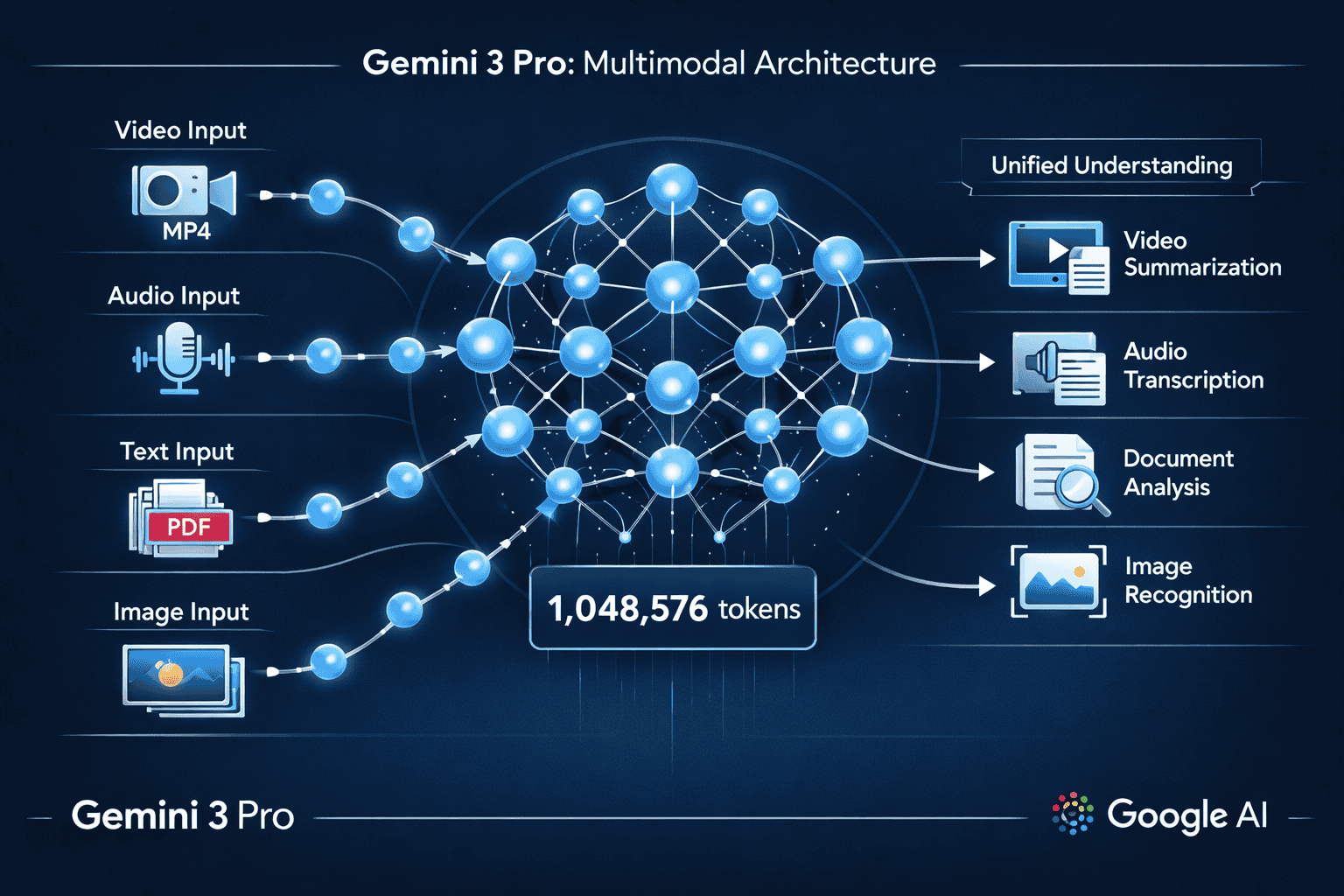
- Massive 1,048,576 token context window enables processing feature-length videos, extensive document collections, and large codebases in single API calls without expensive chunking strategies
- Multimodal architecture processes text, images, video, audio, and PDFs within unified understanding framework, with substantially improved 3D spatial reasoning and cross-modal correlation
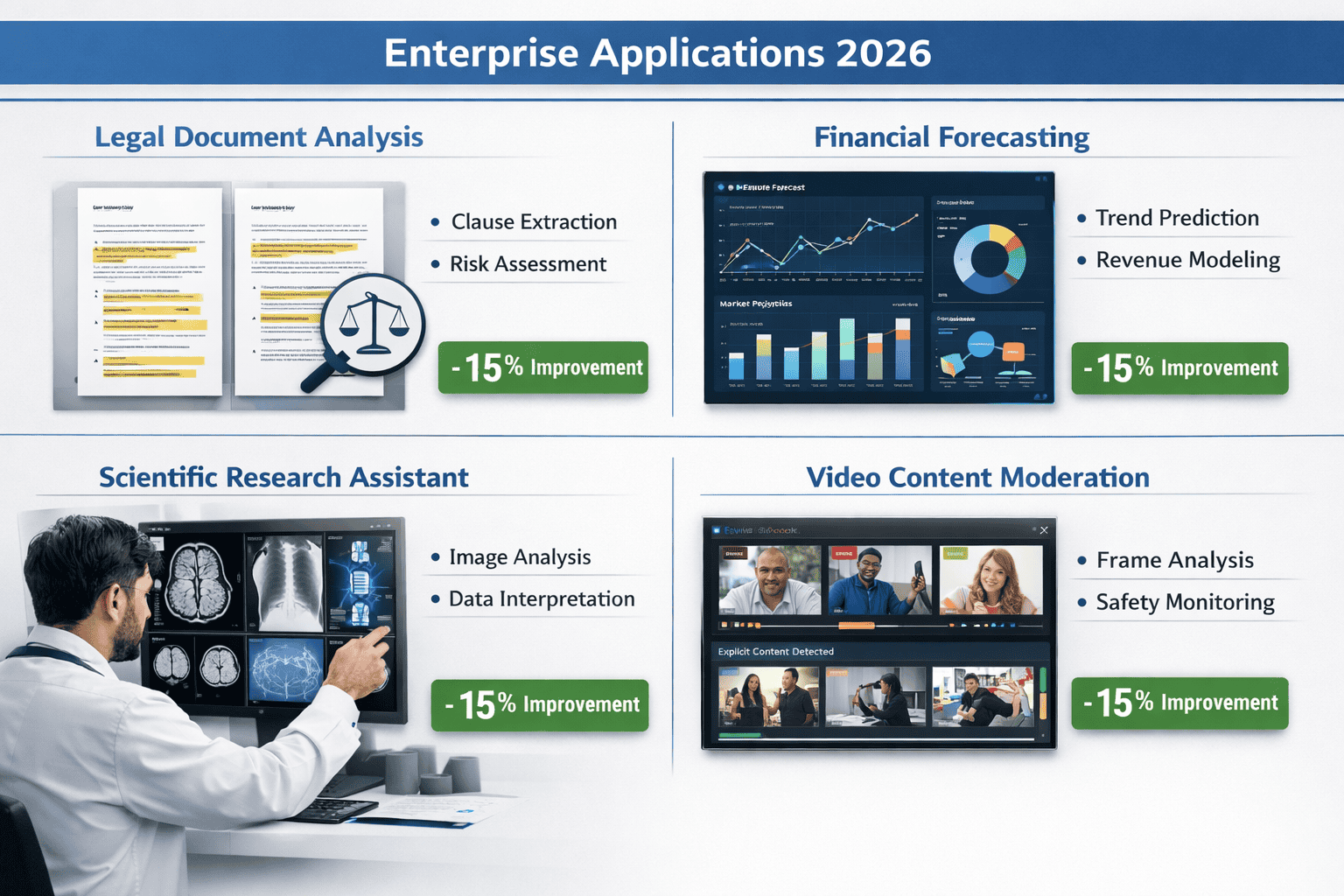
- Enterprise applications in legal document analysis, financial forecasting, scientific research, and software development show 15% quality improvements over previous versions, reducing downstream revision costs
- Integration through Google AI Studio, Vertex AI, and Gemini API provides flexible deployment options from prototyping to production-scale enterprise systems with SLA guarantees
- Video and audio processing capabilities excel at scene analysis, transcription with speaker diarization, emotion detection, and content moderation with contextual understanding that reduces false positives
- Token efficiency improvements deliver lower per-task costs despite competitive per-token pricing, with the model requiring fewer output tokens for reliable results
- Agentic workflow optimization enables precise multi-step task execution and tool usage, positioning the model for autonomous workflow applications
- Platform selection strategy should match access tier to use case: Google AI Studio for prototyping, Gemini API for moderate-scale production, Vertex AI for enterprise deployment, or MULTIBLY for multi-model comparison and optimization
Quick Answer
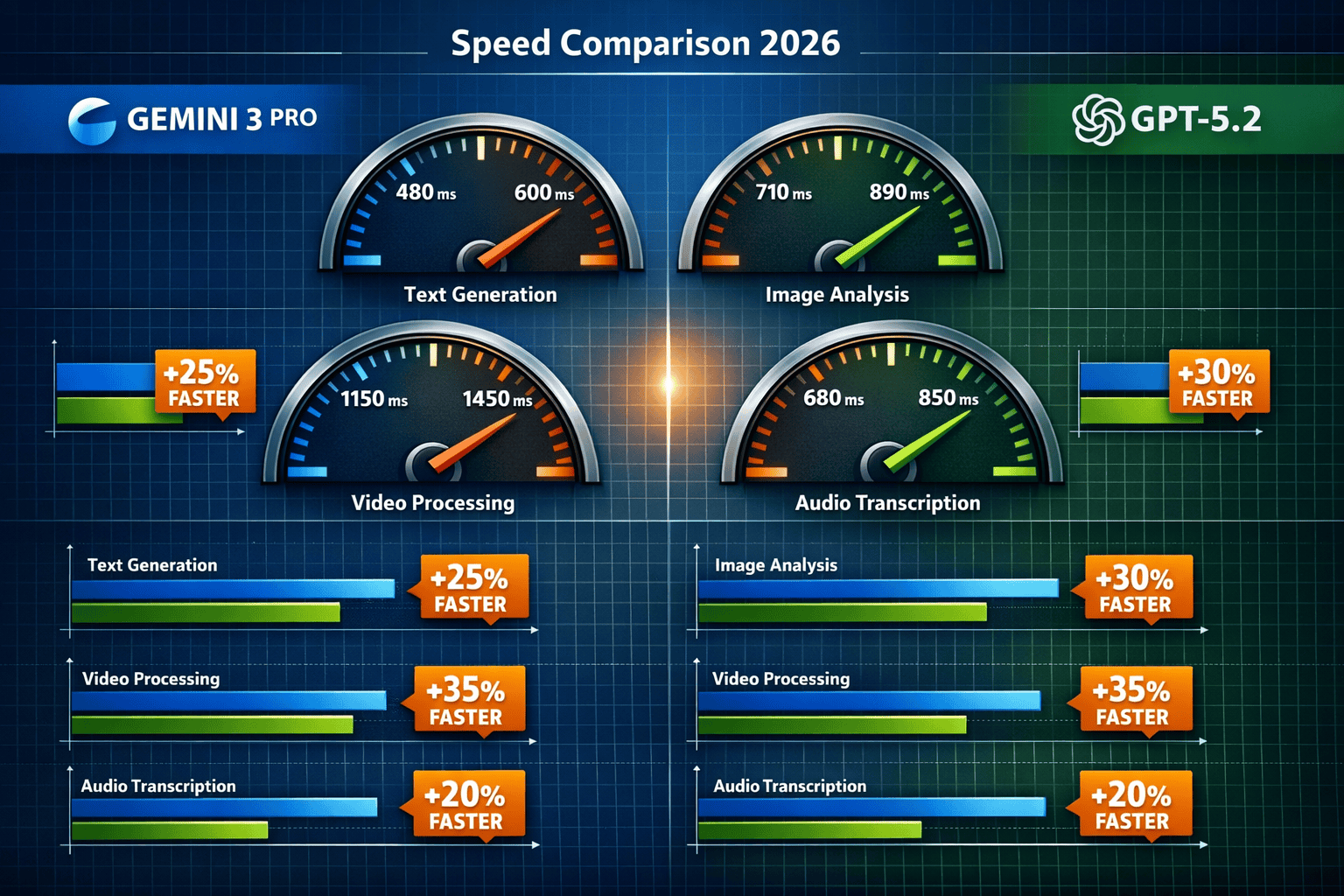
Gemini 3 Pro (specifically the 3.1 Pro variant launched February 20, 2026) represents Google’s strategic pivot toward enterprise-grade reasoning and multimodal excellence rather than pure speed optimization. While the model delivers competitive processing speeds, its real strength lies in handling complex, multi-step workflows across text, video, audio, and images with superior accuracy compared to GPT-5.2 and Claude models. For developers building video analysis platforms or audio processing applications, Gemini 3.1 Pro’s combination of massive context windows (1M+ tokens) and robust multimodal understanding creates distinct advantages through the Google AI platform.
What Makes Gemini 3.1 Pro Different from Standard Speed-Focused Models?
Gemini 3.1 Pro prioritizes intelligent processing over raw speed, focusing on complex reasoning and multimodal understanding rather than competing solely on millisecond response times. Released on February 20, 2026, this model represents Google DeepMind’s bet that enterprise customers value accuracy and nuance more than marginal speed gains.[1]
The key differentiation comes from three core improvements:
Advanced Reasoning Architecture
- Achieved 77.1% on ARC-AGI-2, a benchmark designed to test general intelligence rather than pattern matching[3]
- More than doubled the performance of Gemini 3 Pro (released November 2025)
- Outperformed Claude Opus 4.6, Claude Sonnet 4.6, and GPT-5.2 on this challenging assessment
Multimodal Integration Depth
- Processes text, images, video, audio, and PDF text within a unified understanding framework[4]
- Handles 1,048,576 tokens, enabling analysis of feature-length videos or extensive document collections
- Demonstrates substantially improved 3D spatial reasoning, successfully handling edge cases in animation pipelines where competing models fail[5]
Enterprise Workflow Optimization
- Specifically engineered for agentic workflows requiring precise tool usage and multi-step execution[4]
- Delivers 15% quality improvement over Gemini 3 Pro Preview in enterprise evaluations[5]
- Requires fewer output tokens for reliable results, improving both efficiency and cost-effectiveness
Common mistake: Assuming “Pro” designation means faster processing. In practice, Google positioned 3.1 Pro for scenarios where getting the right answer matters more than getting any answer quickly—legal document analysis, financial forecasting, scientific research assistance, and enterprise software development.[1]
For teams evaluating AI models across multiple use cases, platforms like MULTIBLY enable side-by-side comparisons of Gemini 3.1 Pro against 300+ other models, helping identify which AI delivers the best results for specific tasks rather than relying on vendor claims alone.
How Does Gemini 3.1 Pro’s Multimodal Performance Compare to GPT-5.2?
Gemini 3.1 Pro demonstrates measurable advantages over GPT-5.2 in cross-modal reasoning tasks and complex project generation, particularly when workflows require understanding relationships between different media types. While direct speed benchmarks vary by task, the quality gap matters more for production applications.
Benchmark Performance Comparison
Google’s internal testing showed Gemini 3.1 Pro outperforming GPT-5.2 across multiple dimensions:[3]
| Capability Area | Gemini 3.1 Pro Advantage | Practical Impact |
|---|---|---|
| General Intelligence (ARC-AGI-2) | 77.1% accuracy vs. lower GPT-5.2 scores | Better handling of novel problems requiring reasoning transfer |
| 3D Spatial Understanding | Substantially improved edge case handling | Accurate 3D transformation analysis for animation and CAD workflows |
| Multimodal Context Window | 1,048,576 tokens | Process entire video files with accompanying transcripts and metadata |
| Complex Application Generation | Demonstrated SimCity-like app creation | Single-prompt generation of sophisticated, functional applications |
| Agentic Tool Usage | Optimized for precise multi-step execution | Fewer errors in autonomous task completion chains |
Video Processing Strengths
For video analysis applications, Gemini 3.1 Pro’s architecture provides specific advantages:
- Frame-level understanding combined with temporal reasoning across extended sequences
- Audio-visual correlation that maintains context between spoken content and visual elements
- Scene transition recognition with accurate summarization of narrative flow
- Object persistence tracking across camera angle changes and lighting variations
Early enterprise users report that Gemini 3.1 Pro correctly identifies subtle visual details that GPT-5.2 misses, particularly in technical domains like medical imaging analysis or manufacturing quality control.
Audio Processing Capabilities
The model handles audio inputs with nuanced understanding:
- Accurate transcription with speaker diarization in multi-participant conversations
- Emotion and tone detection that informs content moderation decisions
- Background noise filtering for cleaner semantic extraction
- Musical element recognition including genre, instrumentation, and mood classification
Choose Gemini 3.1 Pro over GPT-5.2 when: Your application requires understanding relationships between multiple media types (video + transcript + metadata), needs to process very long contexts (100K+ tokens), or demands high accuracy in specialized domains where errors carry significant cost.
Choose GPT-5.2 when: You need the broadest ecosystem compatibility, prefer OpenAI’s API structure, or have workflows already optimized for GPT model behaviors.
For teams managing multiple AI models, comparing responses side by side reveals these quality differences more clearly than benchmark scores alone.
What Are the Best Integration Strategies for Video Applications Using Gemini 3.1 Pro?
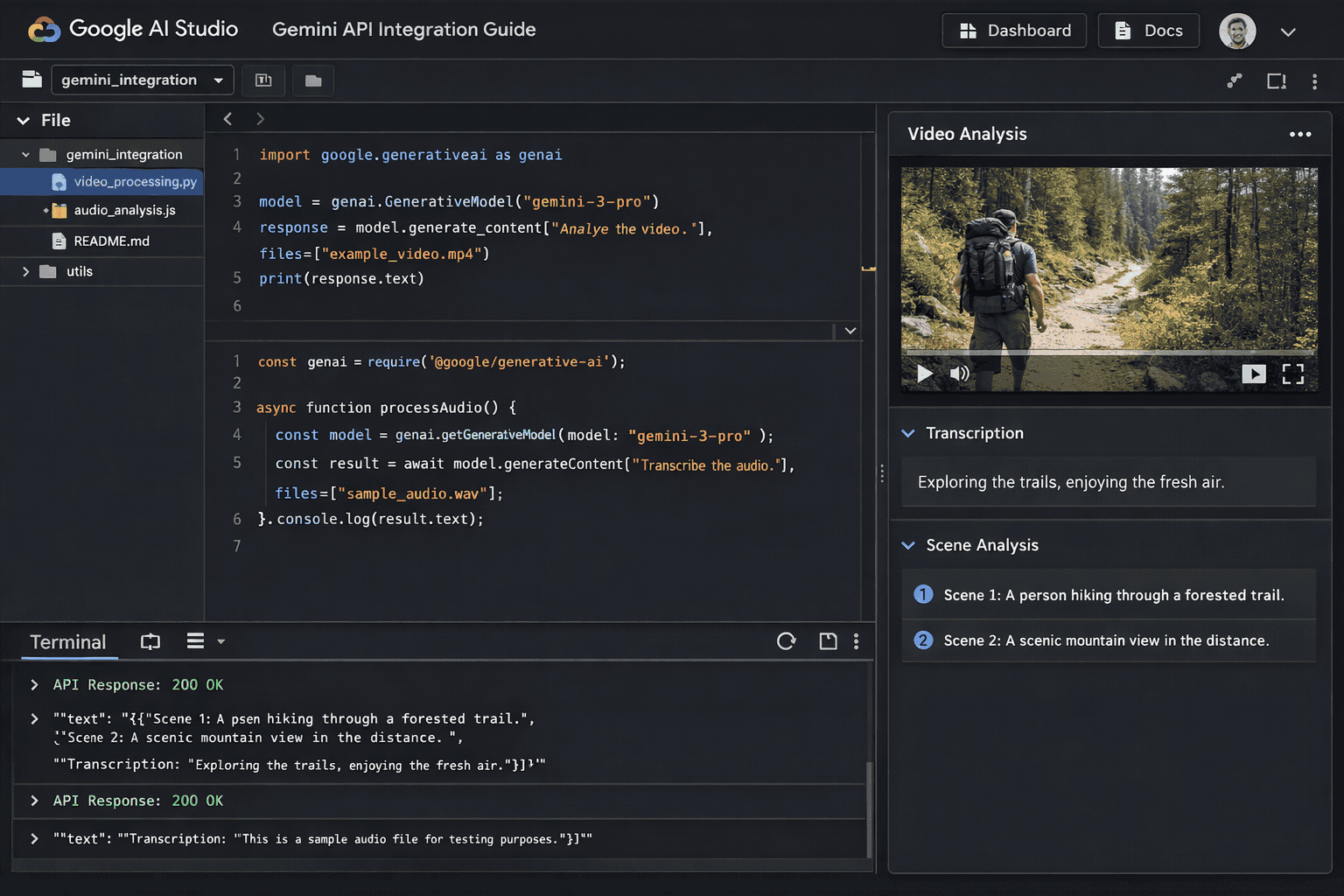
Integrating Gemini 3.1 Pro for video processing requires understanding Google’s platform architecture and optimizing for the model’s multimodal strengths. The model is available through multiple access points, each suited for different development scenarios.[2][5]
Platform Access Options
Google AI Studio (Best for prototyping and testing)
- Visual interface for experimenting with prompts and multimodal inputs
- Direct upload of video files up to the token limit
- Real-time preview of model responses with adjustable parameters
- Free tier available for initial development and proof-of-concept work
Vertex AI (Best for production deployments)
- Enterprise-grade infrastructure with SLA guarantees
- Advanced monitoring, logging, and performance analytics
- Integration with Google Cloud services (Storage, BigQuery, Dataflow)
- Batch processing capabilities for high-volume video analysis
Gemini API via Google AI Platform (Best for custom applications)
- RESTful API with comprehensive SDKs (Python, JavaScript, Go, Java)
- Flexible authentication using API keys or OAuth 2.0
- Rate limiting and quota management for cost control
- Webhook support for asynchronous processing of large video files
Step-by-Step Video Integration Guide
1. Prepare Your Video Assets
- Convert videos to supported formats (MP4, MOV, AVI, WebM)
- Calculate token usage: approximately 1 token per 2-3 video frames at standard resolution
- For long videos (>30 minutes), consider chunking with overlap to maintain context
- Store videos in Google Cloud Storage for fastest access from Vertex AI
2. Structure Your Prompts for Maximum Accuracy
<code>Analyze this video and provide:
1. Scene-by-scene breakdown with timestamps
2. Identification of key objects and their interactions
3. Transcript of all spoken dialogue with speaker labels
4. Summary of main themes and narrative arc
5. Flagged content requiring human review (specify criteria)
</code>
3. Optimize API Calls
- Use streaming responses for real-time processing feedback
- Implement retry logic with exponential backoff for transient errors
- Cache intermediate results to avoid reprocessing identical video segments
- Monitor token usage to stay within budget constraints
4. Handle Multimodal Outputs
- Parse structured JSON responses for programmatic processing
- Extract timestamp references for video player integration
- Store analysis results in searchable databases (Firestore, BigQuery)
- Generate thumbnail images at key scene transitions for user interfaces
Real-World Video Use Cases
Content Moderation Platforms Process user-uploaded videos to detect policy violations across visual content, audio content, and text overlays simultaneously. Gemini 3.1 Pro’s multimodal understanding identifies context that single-mode analysis misses—for example, distinguishing educational content about sensitive topics from prohibited material.
Video Search and Discovery Enable semantic search across video libraries by analyzing visual scenes, spoken content, on-screen text, and background audio. Users can search for “scenes with dogs playing in parks during sunset” and receive accurate results even when metadata is incomplete.
Automated Video Summarization Generate concise summaries of long-form content (webinars, lectures, conferences) with accurate chapter markers, key quote extraction, and visual highlight reels. The model’s 1M+ token context window handles feature-length content without losing narrative coherence.
Quality Control in Media Production Analyze raw footage for technical issues (lighting problems, audio distortion, continuity errors) and creative elements (pacing, emotional tone, brand guideline compliance) before final editing. Early adopters report 30-40% reduction in post-production revision cycles.
Common Integration Mistakes
Mistake #1: Sending entire high-resolution videos without compression
- Fix: Downsample to 720p or 1080p; Gemini 3.1 Pro’s understanding doesn’t require 4K resolution for most analysis tasks
Mistake #2: Using generic prompts that don’t specify output format
- Fix: Request structured JSON or markdown tables with specific fields to simplify parsing
Mistake #3: Ignoring token limits for very long videos
- Fix: Implement intelligent chunking with 10-15 second overlaps to maintain context across segments
Mistake #4: Not leveraging the model’s agentic capabilities
- Fix: Design multi-step workflows where Gemini 3.1 Pro calls specialized tools (speech-to-text APIs, object detection services) and synthesizes results
For developers working across multiple AI platforms, understanding how different models handle video processing helps optimize cost and quality. The small model revolution shows that specialized smaller models sometimes outperform larger ones for specific tasks, making comparative testing essential.
How Should Teams Integrate Gemini 3.1 Pro for Audio Processing Applications?
Audio processing with Gemini 3.1 Pro unlocks capabilities beyond simple transcription, including emotion detection, speaker analysis, content classification, and multimodal correlation when combined with other input types. The model’s architecture handles audio as a first-class input alongside text and images.[4]
Audio Input Formats and Preparation
Supported Audio Formats
- WAV, MP3, AAC, FLAC, OGG
- Sample rates from 8kHz (phone quality) to 48kHz (studio quality)
- Mono or stereo channels (model extracts spatial information from stereo)
- Maximum duration limited by token budget (approximately 1 token per second of audio)
Preprocessing Best Practices
- Normalize audio levels to -16 LUFS for consistent analysis
- Remove long silence periods (>3 seconds) to conserve tokens
- For multi-speaker content, provide speaker count hints in prompts
- Include relevant metadata (recording context, language, domain) to improve accuracy
Audio Analysis Capabilities
Advanced Transcription Unlike basic speech-to-text services, Gemini 3.1 Pro provides:
- Context-aware transcription that understands domain terminology
- Speaker diarization with personality and role inference
- Punctuation and formatting that reflects actual speech patterns
- Correction of common transcription errors based on semantic understanding
Acoustic Analysis
- Emotion and sentiment detection from vocal tone, pitch, and pacing
- Background environment classification (office, outdoor, vehicle, etc.)
- Music genre and mood identification
- Audio quality assessment (noise levels, distortion, clipping)
Multimodal Audio-Visual Processing When combining audio with video or images:
- Verification that spoken content matches visual elements
- Detection of audio-visual synchronization issues
- Identification of off-screen speakers or sound sources
- Enhanced context understanding from combined modalities
Integration Architecture for Audio Applications
Podcast Analysis Platform Example
<code>Workflow:
1. Upload podcast episode (MP3) to Google Cloud Storage
2. Call Gemini API with audio file and structured prompt
3. Receive analysis including:
   - Full transcript with speaker labels and timestamps
   - Episode summary and key topics discussed
   - Emotional arc analysis (energy levels throughout episode)
   - Advertising break detection and classification
   - Quote extraction for social media promotion
4. Store results in database with searchable metadata
5. Generate user-facing features (chapter markers, search index)
</code>
Customer Service Call Analysis
Process recorded support calls to extract:
- Customer sentiment progression throughout interaction
- Agent performance metrics (empathy, clarity, resolution effectiveness)
- Compliance verification (required disclosures, prohibited statements)
- Knowledge gaps requiring additional training
- Escalation triggers and their root causes
The model’s reasoning capabilities identify subtle patterns—for example, recognizing when a customer’s frustration stems from unclear product documentation rather than agent performance.
Audio Content Moderation
Analyze user-generated audio content for:
- Policy violation detection (hate speech, harassment, threats)
- Copyright infringement through music or audio clip recognition
- Age-appropriate content classification
- Misinformation and harmful advice identification
Gemini 3.1 Pro’s contextual understanding reduces false positives compared to keyword-based filtering, particularly for content that discusses sensitive topics in educational or journalistic contexts.
API Implementation Pattern
Python Example for Audio Analysis
<code class="language-python">import google.generativeai as genai
from google.cloud import storage

# Configure API
genai.configure(api_key='YOUR_API_KEY')
model = genai.GenerativeModel('gemini-3.1-pro')

# Upload audio file
audio_file = genai.upload_file(path='podcast_episode.mp3')

# Structured analysis prompt
prompt = """
Analyze this podcast audio and provide:
1. Complete transcript with speaker labels (Host, Guest)
2. Episode summary (150 words)
3. Key topics discussed with timestamps
4. Sentiment analysis for each speaker
5. Recommended social media quotes (3-5 quotes)
6. Content warnings if applicable

Format as JSON for programmatic processing.
"""

# Generate analysis
response = model.generate_content([prompt, audio_file])
print(response.text)
</code>
Edge Case Handling
- Very long audio files (>2 hours): Chunk into 30-minute segments with 2-minute overlaps
- Multiple languages in single file: Specify language detection in prompt
- Poor audio quality: Request confidence scores for uncertain transcriptions
- Real-time processing needs: Use streaming API with incremental results
For teams comparing audio processing across multiple AI models, MULTIBLY’s platform enables testing the same audio file against Gemini, Claude, GPT, and specialized audio models to identify which delivers the best results for specific use cases.
What Enterprise Use Cases Benefit Most from Gemini 3.1 Pro’s Capabilities?
Gemini 3.1 Pro targets high-stakes enterprise scenarios where accuracy, nuance, and complex reasoning separate useful AI from costly errors. Google’s positioning emphasizes sophisticated business workflows rather than consumer applications.[1]
Legal Document Analysis and Contract Review
Why Gemini 3.1 Pro Excels Here:
- Handles extremely long documents (1M+ token context) without losing critical details
- Identifies subtle clause interactions across multi-document contract sets
- Recognizes legal precedents and jurisdiction-specific language variations
- Flags potential conflicts, ambiguities, and missing standard provisions
Practical Application: Law firms use Gemini 3.1 Pro to analyze merger agreements spanning hundreds of pages, cross-referencing terms across acquisition documents, employment contracts, and regulatory filings. The model identifies inconsistencies that could create liability exposure, reducing manual review time by 60-70% while improving coverage.
Implementation Tip: Provide the model with firm-specific style guides and precedent libraries to calibrate analysis against your standards rather than generic legal norms.
Financial Forecasting and Risk Analysis
Why Gemini 3.1 Pro Excels Here:
- Processes multimodal financial data (earnings call transcripts + financial statements + market data)
- Performs multi-step reasoning across complex financial models
- Identifies non-obvious correlations between market factors
- Generates scenario analyses with probabilistic outcomes
Practical Application: Investment firms combine quarterly earnings call audio, SEC filings (PDFs), and historical price data to generate comprehensive company analyses. Gemini 3.1 Pro correlates management tone and word choice in calls with subsequent financial performance, identifying early warning signals that traditional quantitative analysis misses.
Key Advantage: The 15% quality improvement over previous versions[5] translates to fewer false signals and more reliable investment recommendations in production trading systems.
Scientific Research Assistance
Why Gemini 3.1 Pro Excels Here:
- Understands complex scientific notation and domain-specific terminology
- Analyzes research papers, experimental data, and visual results simultaneously
- Generates hypotheses based on cross-domain pattern recognition
- Identifies methodological flaws and suggests experimental improvements
Practical Application: Pharmaceutical researchers upload clinical trial protocols, patient outcome data, and medical imaging to identify unexpected drug interactions or efficacy patterns. The model’s 3D spatial reasoning improvements[5] enhance analysis of molecular structures and protein folding predictions.
Research Workflow:
- Upload literature review (50-100 papers as PDFs)
- Provide experimental data (spreadsheets, imaging files)
- Request synthesis identifying gaps, contradictions, and research opportunities
- Generate hypothesis statements with supporting evidence citations
- Design follow-up experiments based on model recommendations
Enterprise Software Development
Why Gemini 3.1 Pro Excels Here:
- Generates complex, functional applications from natural language descriptions
- Understands system architecture requirements and technical constraints
- Produces code with proper error handling, security considerations, and documentation
- Debugs existing codebases by analyzing logic flow and edge cases
Practical Application: Development teams describe business requirements in plain language, and Gemini 3.1 Pro generates working prototypes including database schemas, API endpoints, user interfaces, and test suites. Community demonstrations show the model creating SimCity-like city planning simulations and complete WebOS environments from single prompts.[3]
Production Reality: While generated code requires review and refinement, developers report 40-50% reduction in initial development time for complex features, with the model handling boilerplate infrastructure so engineers focus on business logic.
Content Moderation at Scale
Why Gemini 3.1 Pro Excels Here:
- Analyzes text, images, video, and audio within unified policy framework
- Understands context that distinguishes educational content from violations
- Handles cultural and linguistic nuances across global user bases
- Reduces false positive rates that frustrate legitimate users
Practical Application: Social platforms process user-generated content combining video, audio commentary, text overlays, and linked articles. Gemini 3.1 Pro evaluates whether content violates community guidelines by understanding creator intent, audience context, and cultural norms rather than applying simplistic keyword filters.
Moderation Workflow:
- User uploads multimodal content (video with audio and captions)
- Gemini 3.1 Pro analyzes across all modalities simultaneously
- Model generates violation probability scores with specific policy references
- Borderline cases flagged for human review with detailed reasoning
- Clear violations automatically removed; appeals include model explanation
For enterprises evaluating whether Gemini 3.1 Pro fits their use case, comparing it against alternatives like Claude 4 Sonnet or specialized models helps identify the best tool for each workflow.
How Does Gemini 3.1 Pro’s Pricing and Availability Compare to Alternatives?
Gemini 3.1 Pro became available on February 20, 2026, through multiple access channels with different pricing structures designed for various user segments.[2][5]
Access Tiers and Availability
Consumer Access (Gemini App)
- Google AI Pro subscribers: Full access to Gemini 3.1 Pro in the Gemini app and NotebookLM
- Google AI Ultra subscribers: Priority access with higher rate limits
- Free users: Limited to two queries as of launch; broader free access planned for future rollout[3]
Developer Access (API)
- Google AI Studio: Free tier for prototyping and testing with rate limits
- Gemini API: Pay-per-use pricing based on token consumption (input + output tokens)
- Vertex AI: Enterprise pricing with committed use discounts and volume tiers
Enterprise Platforms
- Gemini Enterprise: Bundled with Google Workspace Enterprise subscriptions
- Google Antigravity: Agentic development platform with Gemini 3.1 Pro integration for autonomous workflows
- Gemini CLI: Command-line access for developer workflows and automation
Pricing Considerations vs. Competitors
While Google hasn’t published detailed public pricing for Gemini 3.1 Pro as of the February 20 launch, enterprise customers report cost structures competitive with GPT-5.2 and Claude Opus 4.6 on a per-token basis.
Key Pricing Factors:
Token Efficiency Gemini 3.1 Pro requires fewer output tokens for reliable results[5], meaning lower costs per task even if per-token pricing matches competitors. For applications generating long-form content or detailed analyses, this 10-15% token reduction compounds into significant savings.
Context Window Value The 1,048,576 token context window[4] eliminates the need for expensive chunking and re-processing strategies required by models with smaller windows. Processing a 2-hour video in a single API call costs less than splitting it into 10-minute segments that each require context re-establishment.
Quality-Driven ROI The 15% quality improvement[5] reduces downstream costs from errors, revisions, and manual review. For legal document analysis or financial forecasting, a single prevented error often justifies higher per-query costs.
Multimodal Processing Efficiency Analyzing video, audio, and text in a single API call costs less than using separate specialized models for each modality and then synthesizing results with another model.
Platform Selection Guide
Choose Google AI Studio when:
- Prototyping new applications or testing prompts
- Building personal projects or small-scale tools
- Learning multimodal AI capabilities
- Budget constraints require free tier usage
Choose Gemini API (direct) when:
- Building production applications with moderate scale
- Need flexible pay-as-you-go pricing without commitments
- Prefer simple API integration without Google Cloud infrastructure
- Want quick deployment without enterprise procurement processes
Choose Vertex AI when:
- Deploying enterprise-scale production systems
- Require SLA guarantees and dedicated support
- Need integration with existing Google Cloud infrastructure
- Want advanced monitoring, logging, and compliance features
- Can commit to volume pricing for cost optimization
Choose Gemini Enterprise when:
- Already using Google Workspace Enterprise
- Need organization-wide AI access with centralized management
- Want bundled pricing across Google services
- Require enterprise security and compliance controls
Cost Optimization Strategies
1. Prompt Engineering for Token Efficiency
- Request concise outputs with specific format requirements
- Use structured output formats (JSON, tables) instead of prose
- Implement few-shot examples that demonstrate desired brevity
- Cache reusable prompt components to reduce input token costs
2. Intelligent Batching
- Group similar analysis tasks into single API calls
- Process multiple short videos together rather than individually
- Combine related documents for unified analysis
- Use batch processing APIs for non-time-sensitive workloads
3. Tiered Processing Strategy
- Use smaller models (Phi-4 or Mistral) for simple classification tasks
- Reserve Gemini 3.1 Pro for complex reasoning requiring multimodal understanding
- Implement confidence-based routing (simple cases to cheaper models, uncertain cases to Gemini)
- Monitor per-task costs to identify optimization opportunities
4. Result Caching and Reuse
- Store analysis results for identical or similar content
- Implement semantic similarity matching to reuse previous analyses
- Cache intermediate results in multi-step workflows
- Use vector databases to find previously analyzed similar content
For organizations managing multiple AI models and optimizing costs across providers, MULTIBLY’s platform offers access to 300+ models including Gemini 3.1 Pro through a single subscription, simplifying cost management and enabling rapid model comparison without managing multiple vendor relationships.
What Are the Key Technical Specifications and Limitations of Gemini 3.1 Pro?
Understanding Gemini 3.1 Pro’s technical boundaries helps developers design applications that leverage its strengths while working around constraints.[4]
Core Technical Specifications
Model Architecture
- Release date: February 20, 2026 (preview)[2]
- Context window: 1,048,576 tokens (approximately 1 million tokens)
- Supported modalities: Text, image, video, audio, PDF text[4]
- Output types: Text generation, structured data (JSON), code generation
- Language support: 100+ languages with varying quality levels
Input Constraints
- Maximum file size: Varies by platform (typically 2GB for video files)
- Concurrent requests: Rate limited based on access tier
- Supported image formats: JPEG, PNG, WebP, GIF
- Supported video formats: MP4, MOV, AVI, WebM, FLV
- Supported audio formats: WAV, MP3, AAC, FLAC, OGG
Performance Characteristics
- Latency: Varies by input size and complexity (typically 2-15 seconds for complex multimodal queries)
- Throughput: Optimized for quality over speed; not the fastest model for simple tasks
- Token generation speed: Competitive with GPT-5.2 for similar quality outputs
- Streaming support: Available for real-time response delivery
Known Limitations and Edge Cases
1. Real-Time Processing Constraints
Gemini 3.1 Pro’s focus on complex reasoning means it’s not optimized for applications requiring sub-second responses. For chat applications or interactive tools where speed matters more than depth, smaller models like Phi-4 may deliver better user experience.
Workaround: Use streaming responses to show progressive results, or implement a tiered system where fast models handle simple queries and Gemini 3.1 Pro handles complex requests.
2. Hallucination in Specialized Domains
Despite improvements, the model can generate plausible-sounding but incorrect information in highly specialized technical domains (advanced mathematics, niche legal jurisdictions, cutting-edge scientific research).
Workaround: Implement verification workflows where Gemini 3.1 Pro generates initial analysis, then specialized tools or human experts validate critical claims. Provide domain-specific reference materials in prompts to ground responses.
3. Video Processing Token Consumption
High-resolution or long-duration videos consume significant portions of the context window, leaving less room for detailed prompts or multi-document analysis.
Workaround: Downsample video resolution to 720p or 1080p (sufficient for most analysis tasks), extract keyframes for static scene analysis, or use intelligent chunking with overlap for very long content.
4. Multimodal Reasoning Inconsistencies
While generally strong, the model occasionally misses connections between modalities that humans find obvious—for example, failing to notice that audio commentary contradicts visual evidence in a video.
Workaround: Design prompts that explicitly request cross-modal verification (“Does the spoken content match what’s shown visually?”), and implement confidence scoring for critical applications.
5. Output Format Consistency
When requesting structured outputs (JSON, tables), the model sometimes deviates from specified formats, particularly for complex schemas.
Workaround: Use schema validation libraries to catch format errors, implement retry logic with clarified format requirements, and provide few-shot examples of exact desired output structure.
Comparison with Alternative Models
| Feature | Gemini 3.1 Pro | GPT-5.2 | Claude Opus 4.6 |
|---|---|---|---|
| Context Window | 1,048,576 tokens | ~200,000 tokens | ~200,000 tokens |
| Multimodal Support | Text, image, video, audio, PDF | Text, image, audio | Text, image, PDF |
| Reasoning Strength | Excellent (77.1% ARC-AGI-2) | Very Good | Excellent |
| Speed Optimization | Moderate (quality-focused) | High | Moderate |
| 3D Spatial Understanding | Substantially improved | Good | Good |
| Agentic Workflows | Optimized | Supported | Supported |
| Enterprise Features | Vertex AI integration | Azure OpenAI integration | Claude for Work |
Choose Gemini 3.1 Pro when: You need the largest context window, best-in-class multimodal understanding, or Google Cloud ecosystem integration.
Choose GPT-5.2 when: You need the fastest processing, broadest third-party tool ecosystem, or existing OpenAI infrastructure.
Choose Claude Opus 4.6 when: You prioritize safety and nuance in text generation, need strong coding assistance, or prefer Anthropic’s approach to AI alignment.
For detailed performance comparisons across specific tasks, see our Claude 4 Sonnet vs GPT-4o benchmark analysis.
Best Practices for Production Deployment
Monitoring and Observability
- Track token usage per request to identify cost optimization opportunities
- Monitor latency distributions to detect performance degradation
- Log confidence scores (when available) to identify low-quality outputs
- Implement A/B testing to compare Gemini 3.1 Pro against alternatives for your specific use cases
Error Handling
- Implement exponential backoff for rate limit errors
- Validate outputs against expected schemas before downstream processing
- Provide fallback models for critical workflows when Gemini is unavailable
- Cache successful results to reduce dependency on real-time API availability
Security and Compliance
- Encrypt sensitive data in transit and at rest
- Implement access controls limiting which team members can call the API
- Log all requests for audit compliance in regulated industries
- Review Google’s data processing agreements for GDPR, HIPAA, or other regulatory requirements
Continuous Improvement
- Collect user feedback on output quality for iterative prompt refinement
- Maintain a test suite of representative queries to catch quality regressions
- Monitor Google’s model updates and test new versions before production deployment
- Compare Gemini 3.1 Pro performance against emerging alternatives quarterly
How Will Gemini 3.1 Pro Evolve and What’s Coming Next?
Google’s roadmap for Gemini models suggests continued focus on enterprise capabilities, multimodal depth, and agentic workflows rather than pure speed optimization. Understanding the strategic direction helps teams plan long-term AI investments.
Expected Near-Term Improvements
Broader General Availability The February 20, 2026 launch positioned Gemini 3.1 Pro in preview status across most platforms.[2] Google typically moves models from preview to general availability within 2-4 months, bringing:
- Removal of preview restrictions and rate limits
- Expanded free tier access for developers
- Production SLA guarantees for enterprise customers
- Broader geographic availability in additional regions
Enhanced Agentic Capabilities Google’s emphasis on agentic workflows[4] suggests upcoming improvements in:
- Tool calling accuracy and reliability
- Multi-step task planning and execution
- Error recovery and self-correction
- Integration with Google Workspace tools (Docs, Sheets, Gmail)
The Antigravity platform (Google’s agentic development environment) will likely showcase increasingly sophisticated autonomous workflows powered by Gemini 3.1 Pro.
Specialized Domain Variants Following patterns from competitors, Google may release domain-specific versions:
- Gemini 3.1 Pro Medical: Enhanced with medical knowledge and clinical reasoning
- Gemini 3.1 Pro Legal: Optimized for legal document analysis and precedent research
- Gemini 3.1 Pro Code: Specialized for software development and debugging
These variants would fine-tune the base model on domain-specific data while maintaining the core multimodal and reasoning capabilities.
Strategic Positioning vs. Competitors
Google’s Competitive Advantages
- Ecosystem integration: Tight coupling with Google Cloud, Workspace, and Android
- Multimodal data access: Proprietary training data from YouTube, Google Images, and Google Search
- Infrastructure scale: Global deployment capabilities through Google’s data center network
- Research leadership: DeepMind’s continued breakthroughs in AI reasoning and efficiency
Areas Requiring Improvement
- Developer mindshare: OpenAI maintains stronger developer community and third-party integrations
- Perceived reliability: Some enterprises view Google’s history of discontinuing products as risk factor
- Pricing transparency: Competitors offer clearer, more predictable pricing structures
- Ecosystem lock-in concerns: Enterprises hesitant to depend heavily on single cloud provider
Industry Trends Favoring Gemini’s Approach
Shift from Speed to Quality The AI market is maturing beyond “faster is better” toward “accurate enough for production.” Gemini 3.1 Pro’s quality-first positioning aligns with enterprise needs where errors cost more than milliseconds saved.
Multimodal Integration Demand Real-world applications increasingly require understanding multiple data types simultaneously. Gemini’s unified multimodal architecture provides advantages over systems that bolt together separate text, image, and audio models.
Agentic Workflow Adoption As organizations move from simple AI queries to complex autonomous workflows, models optimized for multi-step reasoning and tool usage (like Gemini 3.1 Pro) gain strategic value.
Context Window Competition The massive 1M+ token context window[4] positions Gemini well as applications demand processing entire codebases, video libraries, or document collections without chunking strategies.
Preparing for Future Gemini Releases
Architecture Flexibility Design applications with model-agnostic interfaces so you can swap between Gemini versions (or competitors) without rewriting core logic. Use abstraction layers that standardize inputs and outputs across different AI providers.
Continuous Evaluation Maintain benchmark test suites that evaluate new model versions against your specific use cases. Google’s rapid release cycle means Gemini 3.2, 3.5, or 4.0 could arrive within months, each with different performance characteristics.
Multi-Model Strategy Rather than betting entirely on Gemini, successful teams use the right model for each task. MULTIBLY’s platform enables this strategy by providing access to 300+ models through a single interface, letting you route different queries to optimal models based on cost, speed, and quality requirements.
Investment in Prompt Engineering As models evolve, well-crafted prompts remain valuable across versions. Build organizational knowledge in effective prompt patterns, few-shot examples, and output formatting that transfers to future Gemini releases.
For teams tracking the broader AI landscape, understanding how open-source alternatives like DeepSeek and specialized models from Essential AI challenge proprietary models helps inform long-term strategy beyond any single vendor.
Frequently Asked Questions
What’s the difference between Gemini 3 Pro and Gemini 3.1 Pro? Gemini 3.1 Pro, released February 20, 2026, is an upgraded version of Gemini 3 Pro (released November 2025) with substantial improvements in complex reasoning, multimodal understanding, and token efficiency. The 3.1 variant achieves 77.1% on ARC-AGI-2 (more than double the 3.0 score) and delivers 15% quality improvements in enterprise evaluations.[3][5]
Is Gemini 3.1 Pro faster than GPT-5.2? Gemini 3.1 Pro prioritizes accuracy and complex reasoning over raw speed. For simple queries, GPT-5.2 often responds faster. For complex multimodal tasks requiring nuanced understanding, Gemini 3.1 Pro delivers higher-quality results that reduce downstream revision time, making it effectively “faster” for production workflows despite potentially longer initial processing.
Can Gemini 3.1 Pro process entire movies? Yes, with its 1,048,576 token context window, Gemini 3.1 Pro can process feature-length films in a single API call.[4] A typical 2-hour movie at standard resolution consumes approximately 200,000-400,000 tokens, leaving substantial room for detailed prompts and analysis requests.
How much does Gemini 3.1 Pro cost compared to alternatives? Google hasn’t published detailed public pricing as of the February 20, 2026 launch. Enterprise customers report per-token costs competitive with GPT-5.2 and Claude Opus 4.6, with lower total costs due to improved token efficiency (requiring fewer output tokens for equivalent quality).[5]
What programming languages are supported for Gemini 3.1 Pro API integration? Google provides official SDKs for Python, JavaScript, Go, and Java. The REST API can be accessed from any language with HTTP capabilities. Community-maintained libraries exist for additional languages including Ruby, PHP, and C#.
Does Gemini 3.1 Pro work offline or require internet connectivity? Gemini 3.1 Pro requires internet connectivity to Google’s API servers. For offline or on-device AI capabilities, consider smaller models designed for local deployment.
Can Gemini 3.1 Pro generate images or only analyze them? As of February 2026, Gemini 3.1 Pro analyzes images but does not generate them. For image generation, Google offers separate models in the Imagen family. The model can, however, generate detailed SVG code for vector graphics and animations.[3]
What’s the maximum video file size Gemini 3.1 Pro can process? Maximum file size varies by platform but typically ranges from 500MB to 2GB. The practical limit is the 1,048,576 token context window rather than file size—longer or higher-resolution videos consume more tokens and may require chunking strategies.
Is Gemini 3.1 Pro available in languages other than English? Yes, Gemini 3.1 Pro supports 100+ languages, though quality varies by language. English, Spanish, French, German, Japanese, Korean, and Chinese show the strongest performance. For specialized domains in less common languages, quality may be lower.
How does Gemini 3.1 Pro handle sensitive or confidential data? Data sent to Gemini API is encrypted in transit. Google’s data processing policies vary by platform (consumer Gemini app vs. enterprise Vertex AI). For highly sensitive data, review Google’s data processing agreements and consider using Vertex AI with customer-managed encryption keys and private endpoints.
Can Gemini 3.1 Pro be fine-tuned on custom data? As of February 2026, Google has not announced public fine-tuning capabilities for Gemini 3.1 Pro. Enterprise customers may have access to custom training through Google Cloud partnerships. For most use cases, prompt engineering with few-shot examples provides sufficient customization.
What happens when Gemini 3.1 Pro encounters content it can’t process? The model returns error messages for unsupported file formats or sizes exceeding limits. For content it can process but finds ambiguous or uncertain, it typically indicates confidence levels or requests clarification. Safety filters block generation for policy-violating requests.
Conclusion
Gemini 3.1 Pro’s February 20, 2026 release marks a strategic inflection point in the AI landscape. Rather than competing solely on speed metrics, Google has positioned this model for scenarios where accuracy, nuance, and sophisticated reasoning create measurable business value. The 77.1% ARC-AGI-2 score, 15% quality improvements in enterprise evaluations, and breakthrough multimodal capabilities demonstrate that the model delivers on this positioning.[3][5]
For teams building production AI applications, Gemini 3.1 Pro’s strengths become most apparent in complex, high-stakes workflows: legal document analysis where missing a clause creates liability, financial forecasting where false signals cost millions, scientific research where methodological errors waste months, or content moderation where false positives alienate users. These applications benefit more from the model’s reasoning depth than from marginal speed improvements.
The massive 1,048,576 token context window and unified multimodal architecture provide distinct advantages for applications processing long-form video content, extensive document collections, or workflows requiring correlation across text, images, audio, and structured data.[4] Integration through Google AI Studio, Vertex AI, and the Gemini API offers flexible deployment paths from rapid prototyping to enterprise-scale production systems.
Actionable Next Steps:
Evaluate fit for your use case: Test Gemini 3.1 Pro against your specific workflows using Google AI Studio’s free tier to determine if its quality improvements justify integration effort.
Compare against alternatives: Use platforms like MULTIBLY to run identical queries against Gemini 3.1 Pro, GPT-5.2, Claude Opus 4.6, and specialized models to identify which delivers best results for each task type.
Start with pilot projects: Deploy Gemini 3.1 Pro for non-critical workflows first, measuring quality, cost, and latency before expanding to production systems.
Invest in prompt engineering: Build organizational knowledge in effective prompt patterns, few-shot examples, and structured output formatting that maximizes the model’s reasoning capabilities.
Design for flexibility: Create model-agnostic application architectures that let you swap between AI providers as capabilities and pricing evolve, avoiding vendor lock-in.
Monitor the competitive landscape: Track emerging models from open-source initiatives, specialized providers, and the small model revolution to ensure Gemini remains optimal for your needs.
The AI landscape evolves rapidly, with new models and capabilities emerging monthly. Success comes not from betting on a single model, but from building systems that leverage the right AI for each specific task—sometimes Gemini 3.1 Pro for complex reasoning, sometimes smaller specialized models for speed and cost efficiency, and sometimes competitors for unique capabilities. The key is maintaining the flexibility to choose based on measured performance rather than vendor marketing.
References
[1] Google Launches Gemini 3 1 Pro For Complex Enterprise Tasks – https://www.techbuzz.ai/articles/google-launches-gemini-3-1-pro-for-complex-enterprise-tasks
[2] Gemini 3 1 Pro – https://blog.google/innovation-and-ai/models-and-research/gemini-models/gemini-3-1-pro/
[3] eu.36kr – https://eu.36kr.com/en/p/3691070216449923
[4] Gemini 3.1 Pro Preview – https://ai.google.dev/gemini-api/docs/models/gemini-3.1-pro-preview
[5] Gemini 3 1 Pro On Gemini Cli Gemini Enterprise And Vertex Ai – https://cloud.google.com/blog/products/ai-machine-learning/gemini-3-1-pro-on-gemini-cli-gemini-enterprise-and-vertex-ai